


rednote
3.812.21K Reviews
App Specs
- Version
- 9.48.1
- Updated On
- License
- Free
- Downloads
- 10,000,000+
- Developer
- 行吟信息科技(上海)有限公司
- Categories
- Social
- Platform
- Android, iOS
Screenshots


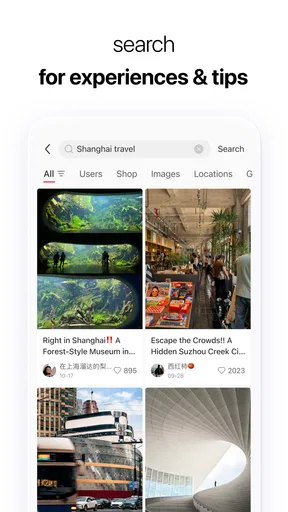




 Analysis by AppCompare
When I open rednote, I think less about keeping a formal diary and more about how people collect things they want to revisit: a place to eat, an outfit idea, a travel plan, or a useful tip. That social, discovery-led feel is what makes it different from a conventional notes app. Its strength is not simply saving a thought; it is giving that thought a place in a wider stream of posts and people.
A social feed that depends on a good connection
The experience makes most sense when your phone is online. Posts, images, search results, and conversations are part of a living social service, so a reliable connection helps the feed feel current and makes browsing more fluid. On a strong network, it is easy to move from one interesting post to another, explore a topic, and follow a trail of recommendations without having to plan the session in advance.
I find that open-ended browsing is both the appeal and the risk. A quick search for a cafe or a skincare routine can turn into a longer look through personal experiences and related ideas. That is useful when I am researching a choice, but less ideal when I only have a moment and need one clear answer. I try to start with a specific question rather than scroll without a purpose; it makes the time feel more worthwhile.
When reception is weak, I would treat the app as something to check again when the connection improves, rather than as a dependable place to retrieve every post immediately. That matters if you are relying on it while moving between train stations, walking through a large building, or trying to make a decision in an area with patchy service. If something is important for the day, I would keep the key details somewhere I can readily access instead of assuming a social feed will be available at exactly the right moment.
Useful in short mobile sessions
rednote suits the small gaps in a day: waiting for a friend, taking a break, or checking ideas before heading out. The phone-first rhythm makes visual discovery feel natural, especially when a post can communicate a mood or an example faster than a long written description. I can imagine using it on the way to meet friends to compare restaurant inspiration, then returning to a specific post when deciding where to go.
For that kind of outing, I would make the search practical: narrow down the area or type of place, read the details in the posts that seem relevant, and save or otherwise keep track of the useful result before leaving the connection behind. Social recommendations can be helpful, but they are not a substitute for checking whether a place fits your timing, budget, or needs. The personal perspective is part of the value, while the same subjectivity means I would not treat every recommendation as a guarantee.
It is less suited to tasks that need a strict, private structure, such as managing a long work checklist or keeping a carefully organized reference library. A dedicated notes or task app is usually better for that. The distinction is useful: rednote can help me discover what people are discussing and gather inspiration, while a conventional organizer is better for turning a fixed set of responsibilities into a system I can reliably maintain.
Worth Reading Before You Choose

Flipboard Shows What News Apps Must Do Beyond the Feed

Switching to Android Auto Means Rethinking Your Driving Routine

Google Calendar Makes a Crowded Week Easier to Manage

Ludo King Makes the Most of the Minutes Between Plans

Baby Panda World Brings Quick Play to Modern Phones, but Its Game Library Feels Busy

ESPN’s Live Game View Makes Following Close Games Easier
Search, context, and what to save
A practical way to use a social discovery app is to search with enough detail to reduce noise. Instead of entering a broad topic and browsing indefinitely, I would add the kind of result I actually need: a neighborhood, an occasion, or a particular style. Then I would compare a few posts rather than letting one polished image settle the decision. This takes a little more intention, but it helps distinguish a genuinely useful recommendation from something that merely catches the eye.
There is also a trade-off between collecting inspiration and collecting too much. If I save every appealing idea, the useful ones become harder to find later. I would keep a light personal rule: save something only when I can imagine using it, and revisit saved material when I have a concrete plan. That turns casual browsing into a small, workable collection instead of another endless feed.
Because the value lies partly in other people’s posts, the experience can vary by subject. A popular topic may offer many perspectives, while a more specific question may take longer to answer or produce results that do not match what I had in mind. I would use it to gather examples and viewpoints, then verify practical details through a source suited to the decision. That is especially sensible for time-sensitive plans.
When the connection falters
Network interruptions can break the browsing rhythm: a post may take longer to appear, a search can feel less responsive, or a conversation may not be convenient to continue until service returns. My simplest recovery approach is to pause rather than repeatedly tapping through the same action. Once the connection is stable, I would retry the search or reopen the relevant area and check whether the content has loaded before acting on it.
This is a small habit, but it prevents a frustrating mobile moment from turning into a string of duplicate actions. If I am using the app to coordinate a plan with someone, I would not make it the only channel for urgent logistics. A direct message or call through a service I already use for that purpose is a better fallback when timing matters.
That dependence on connectivity also shapes where I would use it. At home or somewhere with steady service, leisurely discovery is comfortable. On a commute, I would be more selective and avoid counting on a smooth session from start to finish. In either case, the app works best when I treat browsing as flexible rather than expecting it to behave like a static document stored on my phone.
Data-conscious browsing without guesswork
Images and video-heavy social browsing can use more mobile data than a text-only task, so I would be mindful when using a limited plan. I cannot assume that a quick glance will stay small if it turns into a long session of opening visual posts. When I know I need to conserve data, I would save deeper browsing for a trusted Wi-Fi connection and keep mobile sessions focused on a particular search or conversation.
The same approach helps with battery and attention, even without making assumptions about the app’s technical settings. A focused visit is easier to manage than leaving a feed open while moving around. If I am looking for an idea before a trip, I would gather the useful options in advance, note the details I need, and then use the app on the go only when a new question comes up.
For privacy-minded users, the social nature of the service is worth considering before posting. I would avoid sharing personal details that do not need to be public and think about the audience and context of anything I publish. That is ordinary care on a social platform, not a reason to avoid it; it simply helps keep the boundary between inspiration-sharing and private information clear.
Who will get the most from rednote
As a social app, rednote is a better fit for people who enjoy discovering ideas through other people’s experiences than for people who want a blank page and a private filing cabinet. It can be useful for visual inspiration, researching everyday choices, and seeing how a topic looks in real life rather than only in a polished product description. If I wanted a strict workflow, a dedicated planner would be the more sensible companion.
The usual alternatives each serve a different purpose. General social networks can be stronger when the main goal is keeping up with friends, while image-led bookmarking tools may suit someone who only wants to collect references. A search engine is often faster for a single factual answer. rednote occupies a more social middle ground: it is for browsing and learning from shared posts, with the limitation that relevance and usefulness depend on what people have contributed and how clearly I search.
It is free to install, but in-app purchases are available, ranging from about 49 cents to about 365 dollars per item. I would look at the purchase details carefully before confirming anything, particularly if I only want to browse casually. The app is rated for teens, so families should still use their own judgment about social content and online interaction rather than treating an age label as a complete guide to suitability.
The app is maintained by 行吟信息科技(上海)有限公司. It has an average rating of 4.1 from around 186,000 ratings, with about 12,000 written reviews and over 10 million installs. Those figures suggest a well-used service, but they do not tell me whether a particular feed will match my interests. The best test is whether its posts and community are useful to the topics I actually care about.
For Android users, the current version is 9.19.3 and the minimum operating-system requirement is Android 5.0. It first appeared on December 24, 2014. I would check that my phone’s software is compatible before installing, then judge the experience based on my own connection, browsing habits, and preferred topics rather than expecting every user’s feed to feel the same.
My recommendation is straightforward: try it if you like exploring practical ideas through social posts and are comfortable with an experience shaped by an online feed. Be more cautious if you need dependable access in low-signal places, want a distraction-free reference tool, or prefer not to engage with a social community. Used with a clear purpose and sensible data habits, rednote can make discovery feel personal and enjoyable; used as the answer to every organizational or research need, it is likely to disappoint.
If I were introducing it to a friend, I would suggest starting with one real question—where to eat, what to pack, or how others approach a hobby—then seeing whether the results are useful enough to bring them back. That small test reveals more than an hour of aimless scrolling. For me, the strongest reason to keep it around is the chance to find lived-in perspectives and visual ideas in one place, as long as I remember that a social recommendation is a starting point, not the final word.
Getting Started
First things first, downloading and setting up Rednote is a breeze. Available for both Android and iOS, the app is just a few taps away from being your new best friend in organization. Once you install it, you're greeted with a minimalist interface that's both welcoming and intuitive. No overwhelming menus or unnecessary frills here—just a clean slate ready for your thoughts.
Features to Love
One of the standout features for me is the ability to create different note categories. Whether you need to jot down work ideas, personal reminders, or even shopping lists, Rednote has got you covered. The app lets you tag notes, making it super easy to find what you need later on. Plus, the search function is lightning fast—just type in a keyword, and you'll have your results in an instant.
Another feature I can't stop raving about is the sync capability. Whether you're on your phone, tablet, or computer, your notes are always up to date. No more emailing yourself notes or worrying about losing important info if you switch devices. It's like magic, but better!
User Experience
Now, let's talk about the user experience. The developers have clearly prioritized ease of use. Navigation is smooth, and I love how I can customize the look of my notes with different color themes. It's a small touch, but it makes organizing notes feel less like a chore and more like a creative outlet.
For those who are into voice notes, Rednote has you covered there too. The voice-to-text feature works surprisingly well, capturing my thoughts accurately even when I'm on the go. Perfect for those eureka moments when typing just isn't an option.
Security and Privacy
In today's world, security is paramount, and Rednote takes this seriously. The app offers password protection for sensitive notes, giving you peace of mind that your personal thoughts stay personal. Plus, with their commitment to user privacy, you can rest easy knowing your data isn't being sold to the highest bidder.
Room for Improvement?
No app is perfect, and while Rednote is pretty close, there's always room for growth. One feature I'd love to see is more integration with other productivity tools. Imagine being able to sync your notes directly with calendar events or task managers. That would be a game-changer!
Also, while the app runs smoothly most of the time, there were a couple of instances where it lagged slightly when syncing large notes. Nothing major, but a little polish here could make the experience flawless.
Final Thoughts
All in all, Rednote is an app that does an excellent job of simplifying note-taking while keeping everything organized and accessible. Whether you're a student, a professional, or just someone who loves jotting down ideas, this app is well worth a try. It's like having a digital notebook that never runs out of pages and is always in your pocket.
So, if you're ready to take your note-taking game to the next level, head over to the app store, download Rednote, and start experiencing the magic for yourself. You won't regret it!
Pros
- User-friendly interface for easy navigation.
- Extensive library of music genres.
- Seamless integration with social media.
- High-quality audio streaming.
- Customizable playlists and recommendations.
Cons
- Requires a stable internet connection.
- Limited offline features for free users.
- Subscription can be pricey for some.
- Occasional ads disrupt free version.
- No live radio or podcast options.
FAQs for rednote
What is Rednote and how does it work?
Rednote is an innovative music-sharing app that allows users to express themselves by adding music snippets to their messages. By integrating with your music library, it lets you select clips from your favorite songs to enhance your communication, making your texts more emotive and personal.
Is Rednote free to download and use?
Rednote is free to download on both Android and iOS platforms. While the basic features are free, there may be in-app purchases for premium features or additional music clips. It's advisable to check for any subscription models if you plan to use advanced functionalities.
How does Rednote integrate with my existing music library?
Rednote seamlessly integrates with your existing music library by accessing your device's permissions. Once granted, it can browse and select tracks, allowing you to clip and share specific parts of songs. It’s important to ensure your music app is compatible for a smooth experience.
What privacy measures does Rednote have in place?
Rednote takes privacy seriously, implementing secure data encryption and limiting access to your personal information. Users have control over their shared content, and the app only accesses necessary data to function. Always review the privacy policy for detailed information on data handling.
Can I use Rednote offline, and what are the limitations?
While some features of Rednote may work offline, such as accessing already downloaded music, the full functionality requires an internet connection. This includes downloading new music clips and sharing them with friends. Be aware of data usage if you’re not connected to Wi-Fi.


